Using conditions to show or hide form pages
Last updated:
Sometimes, you will have users who do not need to fill out all of the pages in your form. If these users are shown the pages anyway, this costs them time and effort. Your users might even become so frustrated that they simply stop filling out the form.
To avoid this, you can define conditions on your form pages and specify that the page should be shown or hidden based on the input that has been made into the form.
As an example, let’s say you are creating a seminar registration form that asks attendees whether they want to include lunch in their booking. If your users answer ‘Yes’, they will be shown a page where they can pick out their lunch. However, if they answer ‘No’, this lunch page is not shown but skipped instead. In this way, the form behaviour is shaped by the input from your users.
Read on to find out how you can use page conditions to show or hide your form pages based on user input.
- As a first step, create the whole form, complete with all of the form fields you might need – even if these are not relevant for all of your users. Make sure to place any form fields that are not relevant for all of your users on a separate page. In our example, this would be the field with the lunch options.
- On the form page where your users can pick out their lunch option, activate the Conditions slider in the editing area.
- Now go to the If section and use the Form element drop-down field to select the form element that will be used as the trigger for the condition. In our example, this is the ‘Lunch’ single choice field with its options of Yes and No. Bear in mind that the single choice field must not be placed on the same page where the lunch option is selected but must be placed on an earlier page in your form.
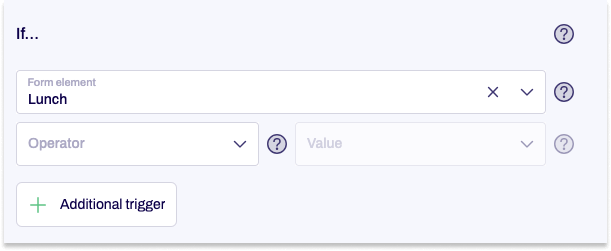
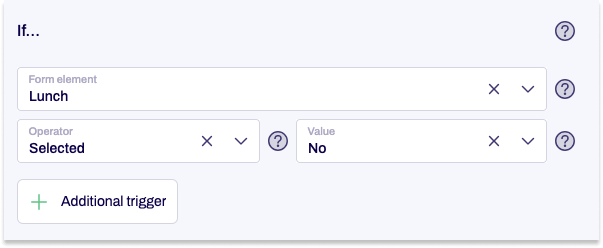
- In our example, the page with the lunch option selection field must be skipped if users don’t want to include the lunch option in their booking and have therefore clicked No in the Lunch single choice field.
Accordingly, you pick ‘Selected’ for Operator and then pick the option No for the Value.
- Under Then, you specify which action is carried out when the criterion specified under If has been met and users have clicked the button on the preceding page. In our example, we pick Skip this page, because the page should not be shown if users have not included lunch in their booking.
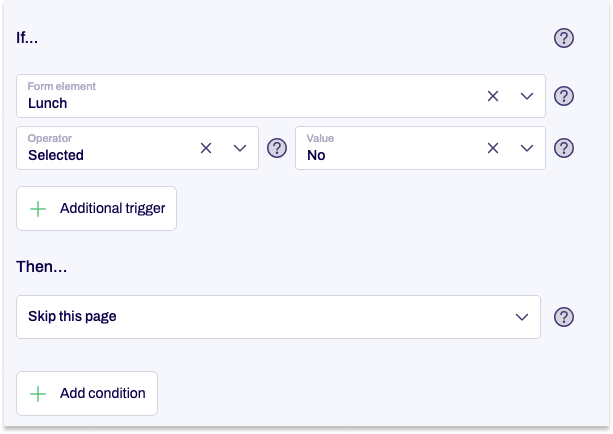
- You can create multiple conditions if you need to. To do so, proceed from step 2 as described.
You have now added a condition to the page.


